Fumadocs 한글 검색 기능 구현하기
2025. 8. 18.

문서 사이트를 운영하다 보면 검색 기능은 필수입니다. 특히 한국어 컨텐츠가 많은 사이트에서는 한글에 특화된 검색 기능이 중요합니다. 이번 글에서는 Fumadocs의 기본 검색 엔진인 Orama가 한글을 제대로 지원하지 않는 문제를 해결하기 위해 커스텀 한글 검색 엔진을 구현한 과정을 공유합니다.
문제 발생
😮 : 한글 검색에 문제가 있나?
Fumadocs를 사용해 문서 사이트를 구축했는데, 한 가지 큰 문제가 있었습니다. 한글 검색이 제대로 작동하지 않는 것이었습니다.
원인 분석
Fumadocs는 기본적으로 Orama라는 검색 엔진을 사용하는데, 검색 결과 알게된 사실은…
GitHub Discussion #748에서 Orama 팀의 답변:
“Korean is a bit tricky, especially without a person who can read and understand it in the team. Let me see if I can find some help.”
”한국어는 특히 팀 내에서 읽고 이해할 수 있는 사람이 없어서 조금 까다롭습니다. 도움을 받을 수 있을까요”
즉, 현재로써는 Orama는 공식적으로 한글을 지원하지 않습니다. 😱
다른 방법은 없을까
- Algolia 도입: 유료 서비스로 한글을 지원하지만 비용 부담
- 검색 엔진 직접 구현하기: 직접 개발해야 하지만 한글에 최적화 가능
비용과 한글 UX를 고려하여 검색 엔진을 직접 구현하기로 결정했습니다.
아키텍처 설계
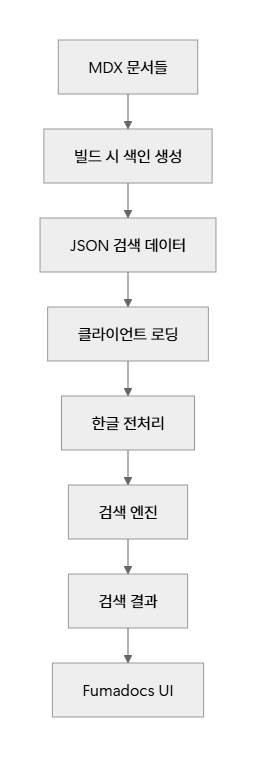
라이브러리 선택
| 라이브러리 | 역할 | 특징 |
|---|---|---|
| hangul-search-js | 한글 초성 검색 | ㄷㅈ → 던전앤파이터 |
| MiniSearch | 전문 검색 엔진 | 9KB, TF-IDF, 퍼지 검색 |
| es-hangul | 한글 처리 유틸 | 초성 분리, Toss 제작 (최고입니다 👍) |
구현 과정
1단계: 패키지 설치
npm 패키지를 설치합니다.
yarn add hangul-search-js minisearch es-hangul
yarn add -D gray-matter tsx
2단계: 검색 인덱스 생성 스크립트
shell 에서 작동할 스크립트를 작성합니다.
1// scripts/build-search-index.ts
2import fs from 'fs';
3import path from 'path';
4import matter from 'gray-matter';
5
6interface SearchDocument {
7  id: string;
8  title: string;
9  content: string;
10  url: string;
11  section?: string;
12  anchorId?: string;
13}
14
15function buildSearchIndex() {
16  const docsDir = path.join(process.cwd(), 'content/docs');
17  const documents: SearchDocument[] = [];
18
19  function processFile(filePath: string) {
20    const content = fs.readFileSync(filePath, 'utf-8');
21    const { data: frontmatter, content: markdownContent } = matter(content);
22
23    const relativePath = path.relative(docsDir, filePath);
24    const slug = relativePath.replace(/\.mdx?$/, '');
25    const url = `/docs/${slug}`;
26
27    // 헤딩을 파싱하여 섹션별로 분리
28    const headings = markdownContent.match(/^#{1,6}\s+(.+)$/gm) || [];
29
30    let currentSection = '';
31    let currentContent = '';
32    let sectionIndex = 0;
33
34    const lines = markdownContent.split('\n');
35
36    for (const line of lines) {
37      const headingMatch = line.match(/^(#{1,6})\s+(.+)$/);
38
39      if (headingMatch) {
40        // 이전 섹션 저장
41        if (currentContent.trim()) {
42          const anchorId = generateAnchorId(currentSection);
43          documents.push({
44            id: `${slug}-${sectionIndex}`,
45            title: frontmatter.title || 'Untitled',
46            content: currentContent.trim(),
47            url,
48            section: currentSection,
49            anchorId: anchorId
50          });
51          sectionIndex++;
52        }
53
54        // 새 섹션 시작
55        currentSection = headingMatch[2];
56        currentContent = '';
57      } else {
58        currentContent += line + '\n';
59      }
60    }
61
62    // 마지막 섹션 처리
63    if (currentContent.trim()) {
64      const anchorId = generateAnchorId(currentSection);
65      documents.push({
66        id: `${slug}-${sectionIndex}`,
67        title: frontmatter.title || 'Untitled',
68        content: currentContent.trim(),
69        url,
70        section: currentSection,
71        anchorId: anchorId
72      });
73    }
74
75    // 메인 문서 (전체 내용)
76    documents.push({
77      id: `${slug}-main`,
78      title: frontmatter.title || 'Untitled',
79      content: markdownContent,
80      url,
81    });
82  }
83
84  function processDirectory(dir: string) {
85    const files = fs.readdirSync(dir);
86
87    for (const file of files) {
88      const fullPath = path.join(dir, file);
89      const stat = fs.statSync(fullPath);
90
91      if (stat.isDirectory()) {
92        processDirectory(fullPath);
93      } else if (file.endsWith('.mdx') || file.endsWith('.md')) {
94        processFile(fullPath);
95      }
96    }
97  }
98
99  function generateAnchorId(text: string): string {
100    return text
101      .toLowerCase()
102      .replace(/[^\w\s-가-힣]/g, '') // 한글 포함
103      .replace(/\s+/g, '-')
104      .trim();
105  }
106
107  processDirectory(docsDir);
108
109  // JSON 파일로 저장
110  const outputPath = path.join(process.cwd(), 'public/search-data.json');
111  fs.writeFileSync(outputPath, JSON.stringify(documents, null, 2));
112
113  console.log(`검색 인덱스 생성 완료: ${documents.length}개 문서`);
114  console.log(`저장 위치: ${outputPath}`);
115
116  // 샘플 출력
117  console.log('\n생성된 문서 샘플:');
118  documents.slice(0, 3).forEach(doc => {
119    const preview = doc.content.substring(0, 50) + '...';
120    console.log(`- ${doc.title}: ${preview}`);
121  });
122}
123
124buildSearchIndex();
빌드 스크립트 통합
package.json 을 아래와 같이 업데이트합니다.
1{
2  "scripts": {
3    "build-search": "tsx scripts/build-search-index.ts",
4    "build": "yarn build-search && next build",
5    "dev": "yarn build-search && next dev --turbo"
6  }
7}
3단계: 한글 검색 엔진 구현
한글 검색 엔진을 구현합니다.
1// lib/korean-search.ts
2import HangulSearch from 'hangul-search-js';
3import MiniSearch from 'minisearch';
4import { getChoseong } from 'es-hangul';
5
6export interface SearchResult {
7  id: string;
8  title: string;
9  content: string;
10  url: string;
11  section?: string;
12  anchorId?: string;
13  score: number;
14  highlight: string;
15}
16
17interface SearchDocument {
18  id: string;
19  title: string;
20  content: string;
21  url: string;
22  section?: string;
23  anchorId?: string;
24}
25
26export class KoreanSearchEngine {
27  private miniSearch: MiniSearch;
28  private documents: SearchDocument[] = [];
29  private hangulSearch: HangulSearch;
30  private titleMap: Map<string, SearchDocument[]> = new Map();
31
32  constructor() {
33    // MiniSearch 설정
34    this.miniSearch = new MiniSearch({
35      fields: ['title', 'content', 'section'],
36      storeFields: ['title', 'content', 'url', 'section', 'anchorId'],
37      searchOptions: {
38        boost: { title: 3, section: 2 },
39        fuzzy: 0.2,
40        prefix: true,
41      },
42    });
43
44    // HangulSearch 설정
45    this.hangulSearch = new HangulSearch();
46  }
47
48  async loadDocuments(url: string): Promise<void> {
49    try {
50      const response = await fetch(url);
51      if (!response.ok) {
52        throw new Error(`Failed to fetch search data: ${response.statusText}`);
53      }
54
55      this.documents = await response.json();
56      this.miniSearch.addAll(this.documents);
57      this.buildTitleMap();
58
59      console.log(`검색 엔진 초기화 완료: ${this.documents.length}개 문서`);
60    } catch (error) {
61      console.error('검색 데이터 로드 실패:', error);
62      throw error;
63    }
64  }
65
66  private buildTitleMap(): void {
67    this.titleMap.clear();
68    for (const doc of this.documents) {
69      const title = doc.title;
70      if (!this.titleMap.has(title)) {
71        this.titleMap.set(title, []);
72      }
73      this.titleMap.get(title)!.push(doc);
74    }
75  }
76
77  search(query: string, limit: number = 10): SearchResult[] {
78    if (!query.trim()) return [];
79
80    const trimmedQuery = query.trim();
81
82    // 1. 초성 검색 (ㄱ-ㅎ 문자만 포함된 경우)
83    if (this.isChosung(trimmedQuery)) {
84      return this.searchByChosung(trimmedQuery, limit);
85    }
86
87    // 2. 한글 부분 검색
88    const hangulResults = this.searchByHangul(trimmedQuery, limit);
89
90    // 3. 전문 검색 (MiniSearch)
91    const fullTextResults = this.searchByFullText(trimmedQuery, limit);
92
93    // 결과 병합 및 중복 제거
94    const combinedResults = this.combineResults(
95      hangulResults,
96      fullTextResults,
97      limit
98    );
99
100    return combinedResults;
101  }
102
103  private isChosung(text: string): boolean {
104    return /^[ㄱ-ㅎ]+$/.test(text);
105  }
106
107  private searchByChosung(chosung: string, limit: number): SearchResult[] {
108    const matches: SearchResult[] = [];
109
110    for (const [title, docs] of this.titleMap.entries()) {
111      const titleChosung = getChoseong(title);
112      if (titleChosung.includes(chosung)) {
113        // 대표 문서 하나만 반환 (메인 문서 우선)
114        const mainDoc = docs.find(doc => doc.id.includes('-main')) || docs[0];
115        matches.push({
116          ...mainDoc,
117          score: 1.0,
118          highlight: this.highlightChosung(title, chosung),
119        });
120
121        if (matches.length >= limit) break;
122      }
123    }
124
125    return matches;
126  }
127
128  private searchByHangul(query: string, limit: number): SearchResult[] {
129    const results: SearchResult[] = [];
130
131    for (const doc of this.documents) {
132      // 제목에서 검색
133      const titleMatch = this.hangulSearch.search(query, doc.title);
134      if (titleMatch.length > 0) {
135        results.push({
136          ...doc,
137          score: 0.9,
138          highlight: this.highlightText(doc.title, query),
139        });
140        continue;
141      }
142
143      // 섹션에서 검색
144      if (doc.section) {
145        const sectionMatch = this.hangulSearch.search(query, doc.section);
146        if (sectionMatch.length > 0) {
147          results.push({
148            ...doc,
149            score: 0.8,
150            highlight: this.highlightText(doc.section, query),
151          });
152          continue;
153        }
154      }
155
156      // 내용에서 검색
157      const contentMatch = this.hangulSearch.search(query, doc.content);
158      if (contentMatch.length > 0) {
159        results.push({
160          ...doc,
161          score: 0.7,
162          highlight: this.highlightText(doc.content.substring(0, 200), query),
163        });
164      }
165    }
166
167    return results
168      .sort((a, b) => b.score - a.score)
169      .slice(0, limit);
170  }
171
172  private searchByFullText(query: string, limit: number): SearchResult[] {
173    try {
174      const results = this.miniSearch.search(query, { limit });
175
176      return results.map(result => ({
177        id: result.id,
178        title: result.title,
179        content: result.content,
180        url: result.url,
181        section: result.section,
182        anchorId: result.anchorId,
183        score: result.score,
184        highlight: this.highlightText(result.content.substring(0, 200), query),
185      }));
186    } catch (error) {
187      console.warn('전문 검색 실패:', error);
188      return [];
189    }
190  }
191
192  private combineResults(
193    hangulResults: SearchResult[],
194    fullTextResults: SearchResult[],
195    limit: number
196  ): SearchResult[] {
197    const seenIds = new Set<string>();
198    const combined: SearchResult[] = [];
199
200    // 한글 검색 결과 우선 추가
201    for (const result of hangulResults) {
202      if (!seenIds.has(result.id)) {
203        seenIds.add(result.id);
204        combined.push(result);
205      }
206    }
207
208    // 전문 검색 결과 추가 (중복 제거)
209    for (const result of fullTextResults) {
210      if (!seenIds.has(result.id)) {
211        seenIds.add(result.id);
212        combined.push(result);
213      }
214    }
215
216    return combined
217      .sort((a, b) => b.score - a.score)
218      .slice(0, limit);
219  }
220
221  private highlightText(content: string, query: string): string {
222    const regex = new RegExp(
223      `(${query.replace(/[.*+?^${}()|[\]\\]/g, '\\$&')})`,
224      'gi'
225    );
226    return content.replace(regex, '<mark>$1</mark>');
227  }
228
229  private highlightChosung(title: string, chosung: string): string {
230    // 초성 매치 하이라이팅은 복잡하므로 일단 제목만 반환
231    return title;
232  }
233}
234
4단계: React 훅으로 상태 관리
3단계에서 작성한 Class를 초기화하고 훅을 작성합니다.
1// hooks/useKoreanSearch.ts
2import { useState, useEffect, useCallback } from 'react';
3import { KoreanSearchEngine, type SearchResult } from '@/lib/korean-search';
4
5export function useKoreanSearch() {
6  const [searchEngine, setSearchEngine] = useState<KoreanSearchEngine | null>(null);
7  const [isLoading, setIsLoading] = useState(true);
8  const [error, setError] = useState<string | null>(null);
9
10  // 검색 엔진 초기화
11  useEffect(() => {
12    const initSearchEngine = async () => {
13      try {
14        setIsLoading(true);
15        const engine = new KoreanSearchEngine();
16
17        // basePath 고려 (GitHub Pages용)
18        const basePath = process.env.NODE_ENV === 'production' ? '/neople-sdk-js-docs' : '';
19        await engine.loadDocuments(`${basePath}/search-data.json`);
20
21        setSearchEngine(engine);
22        setError(null);
23      } catch (err) {
24        console.error('검색 엔진 초기화 실패:', err);
25        setError(err instanceof Error ? err.message : '검색 엔진 초기화에 실패했습니다.');
26      } finally {
27        setIsLoading(false);
28      }
29    };
30
31    initSearchEngine();
32  }, []);
33
34  // 검색 실행
35  const search = useCallback((query: string, limit = 10): SearchResult[] => {
36    if (!searchEngine || !query.trim()) {
37      return [];
38    }
39
40    try {
41      return searchEngine.search(query, limit);
42    } catch (err) {
43      console.error('검색 실행 실패:', err);
44      setError(err instanceof Error ? err.message : '검색 중 오류가 발생했습니다.');
45      return [];
46    }
47  }, [searchEngine]);
48
49  return {
50    search,
51    isLoading,
52    error,
53    isReady: !isLoading && !error && searchEngine !== null,
54  };
55}
56
5단계: 검색 UI 컴포넌트 구현
검색 다이얼로그를 작성합니다. 4단계에서 작성한 훅을 여기서 사용합니다.
1// components/KoreanSearchDialog.tsx
2import { useState, useEffect, useRef, useCallback } from 'react';
3import { useKoreanSearch } from '@/hooks/useKoreanSearch';
4import type { SearchResult } from '@/lib/korean-search';
5
6interface Props {
7  open: boolean;
8  onOpenChange: (open: boolean) => void;
9}
10
11export function KoreanSearchDialog({ open, onOpenChange }: Props) {
12  const [query, setQuery] = useState('');
13  const [results, setResults] = useState<SearchResult[]>([]);
14  const [selectedIndex, setSelectedIndex] = useState(0);
15  const inputRef = useRef<HTMLInputElement>(null);
16
17  const { search, isLoading, error, isReady } = useKoreanSearch();
18
19  // 다이얼로그 열릴 때 입력 필드에 포커스
20  useEffect(() => {
21    if (open && inputRef.current) {
22      inputRef.current.focus();
23    }
24  }, [open]);
25
26  // 결과 클릭 핸들러
27  const handleResultClick = useCallback(
28    (result: SearchResult) => {
29      const basePath =
30        process.env.NODE_ENV === 'production' ? '/neople-sdk-js-docs' : '';
31      const targetUrl = result.anchorId
32        ? `${basePath}${result.url}#${result.anchorId}`
33        : `${basePath}${result.url}`;
34
35      window.location.href = targetUrl;
36      onOpenChange(false);
37
38      // 앵커가 있는 경우 부드러운 스크롤 효과
39      if (result.anchorId) {
40        setTimeout(() => {
41          const element = document.getElementById(result.anchorId!);
42          if (element) {
43            element.scrollIntoView({
44              behavior: 'smooth',
45              block: 'start',
46              inline: 'nearest',
47            });
48          }
49        }, 100); // 페이지 로드 후 스크롤
50      }
51    },
52    [onOpenChange]
53  );
54
55  // 키보드 이벤트 처리
56  useEffect(() => {
57    const handleKeyDown = (e: KeyboardEvent) => {
58      if (!open) return;
59
60      switch (e.key) {
61        case 'Escape':
62          onOpenChange(false);
63          break;
64        case 'ArrowDown':
65          e.preventDefault();
66          setSelectedIndex(prev => Math.min(prev + 1, results.length - 1));
67          break;
68        case 'ArrowUp':
69          e.preventDefault();
70          setSelectedIndex(prev => Math.max(prev - 1, 0));
71          break;
72        case 'Enter':
73          e.preventDefault();
74          if (results[selectedIndex]) {
75            handleResultClick(results[selectedIndex]);
76          }
77          break;
78      }
79    };
80
81    document.addEventListener('keydown', handleKeyDown);
82    return () => document.removeEventListener('keydown', handleKeyDown);
83  }, [open, results, selectedIndex, onOpenChange, handleResultClick]);
84
85  // 검색 결과가 변경될 때 선택 인덱스 초기화
86  useEffect(() => {
87    setSelectedIndex(0);
88  }, [results]);
89
90  // 검색 실행
91  useEffect(() => {
92    if (!isReady || !query.trim()) {
93      setResults([]);
94      return;
95    }
96
97    const searchResults = search(query, 10);
98    setResults(searchResults);
99  }, [query, search, isReady]);
100
101  const handleSuggestionClick = (suggestion: string) => {
102    setQuery(suggestion);
103  };
104
105  const highlightText = (text: string, query: string) => {
106    if (!query.trim()) return text;
107
108    const regex = new RegExp(
109      `(${query.replace(/[.*+?^${}()|[\]\\]/g, '\\$&')})`,
110      'gi'
111    );
112    return text.replace(regex, '<mark>$1</mark>');
113  };
114
115  if (!open) return null;
116
117  return (
118    <div className="fixed inset-0 z-50 bg-black/50 flex items-start justify-center pt-16">
119      <div className="bg-white dark:bg-gray-800 rounded-lg shadow-xl w-full max-w-2xl mx-4 max-h-[80vh] overflow-hidden">
120        {/* 검색 입력 */}
121        <div className="p-4 border-b border-gray-200 dark:border-gray-700">
122          <input
123            ref={inputRef}
124            type="text"
125            value={query}
126            onChange={(e) => setQuery(e.target.value)}
127            placeholder="검색어를 입력하세요... (예: getCharacter, ㄷㅈ, 던전)"
128            className="w-full px-3 py-2 border border-gray-300 dark:border-gray-600 rounded-md focus:outline-none focus:ring-2 focus:ring-blue-500 dark:bg-gray-700 dark:text-white"
129          />
130
131          {/* 추천 검색어 */}
132          <div className="mt-2 flex flex-wrap gap-2">
133            {['getCharacter', 'ㄷㅈ', '에러 처리', '타입', 'axios'].map((suggestion) => (
134              <button
135                key={suggestion}
136                onClick={() => handleSuggestionClick(suggestion)}
137                className="px-2 py-1 text-xs bg-gray-100 dark:bg-gray-700 text-gray-600 dark:text-gray-300 rounded hover:bg-gray-200 dark:hover:bg-gray-600 transition-colors"
138              >
139                {suggestion}
140              </button>
141            ))}
142          </div>
143        </div>
144
145        {/* 로딩 및 에러 상태 */}
146        {isLoading && (
147          <div className="p-4 text-center text-gray-500">
148            검색 엔진을 로딩 중입니다...
149          </div>
150        )}
151
152        {error && (
153          <div className="p-4 text-center text-red-500">
154            오류: {error}
155          </div>
156        )}
157
158        {/* 검색 결과 */}
159        {isReady && !isLoading && (
160          <div className="max-h-96 overflow-y-auto">
161            {results.length === 0 && query.trim() && (
162              <div className="p-4 text-center text-gray-500">
163                '{query}'에 대한 검색 결과가 없습니다.
164              </div>
165            )}
166
167            {results.map((result, index) => (
168              <div
169                key={result.id}
170                onClick={() => handleResultClick(result)}
171                className={`p-4 border-b border-gray-100 dark:border-gray-700 cursor-pointer transition-colors ${
172                  index === selectedIndex
173                    ? 'bg-blue-50 dark:bg-blue-900/20'
174                    : 'hover:bg-gray-50 dark:hover:bg-gray-700'
175                }`}
176              >
177                <div className="flex items-start space-x-3">
178                  <div className="flex-1">
179                    <h3 className="font-medium text-gray-900 dark:text-white">
180                      {result.title}
181                      {result.section && (
182                        <span className="text-sm text-gray-500 dark:text-gray-400 ml-2">
183                          › {result.section}
184                        </span>
185                      )}
186                    </h3>
187                    <p
188                      className="text-sm text-gray-600 dark:text-gray-300 mt-1 line-clamp-2"
189                      dangerouslySetInnerHTML={{
190                        __html: highlightText(result.highlight || result.content.substring(0, 150) + '...', query),
191                      }}
192                    />
193                    <div className="flex items-center mt-2 text-xs text-gray-400 dark:text-gray-500">
194                      <span>{result.url}</span>
195                      <span className="ml-2 bg-blue-100 dark:bg-blue-900 text-blue-600 dark:text-blue-300 px-1 rounded">
196                        {Math.round(result.score * 100)}% 일치
197                      </span>
198                    </div>
199                  </div>
200                </div>
201              </div>
202            ))}
203          </div>
204        )}
205
206        {/* 안내 */}
207        <div className="p-3 bg-gray-50 dark:bg-gray-700 text-xs text-gray-500 dark:text-gray-400 border-t border-gray-200 dark:border-gray-600">
208          <div className="flex justify-between">
209            <span>↑↓ 이동 · Enter 선택 · Esc 닫기</span>
210            <span>초성 검색 지원 (예: ㄷㅈ → 던전앤파이터)</span>
211          </div>
212        </div>
213      </div>
214    </div>
215  );
216}
217
사이드바에 검색 트리거 버튼 추가
layout.tsx (Next.js App Router) 파일에 작성한 컴포넌트를 주입합니다.
1// src/app/docs/layout.tsx
2import type { ReactNode } from 'react';
3import { DocsLayout } from 'fumadocs-ui/layouts/docs';
4import { pageTree } from '@/lib/source';
5import { CustomSearchTrigger } from '@/components/CustomSearchTrigger';
6import { useSearchDialog } from '@/components/SearchProvider';
7
8export default function Layout({ children }: { children: ReactNode }) {
9  return (
10    <DocsLayout
11      tree={pageTree}
12      sidebar={{
13        banner: (
14          <div className="p-2">
15            <CustomSearchTrigger onClick={() => {
16              // 검색 다이얼로그 열기
17              const event = new KeyboardEvent('keydown', {
18                key: 'k',
19                ctrlKey: true,
20              });
21              document.dispatchEvent(event);
22            }} />
23          </div>
24        ),
25      }}
26    >
27      {children}
28    </DocsLayout>
29  );
30}
31
6단계: 빌드 프로세스 최적화
GitHub Actions 워크플로우
워크플로우 빌드시에도 검색 인덱스를 생성해야합니다. build 전에 build-search 를 실행합니다.
1# .github/workflows/deploy.yml
2name: Deploy to GitHub Pages
3
4on:
5  push:
6    branches: [main]
7  pull_request:
8    branches: [main]
9
10permissions:
11  contents: read
12  pages: write
13  id-token: write
14
15concurrency:
16  group: 'pages'
17  cancel-in-progress: false
18
19jobs:
20  build:
21    runs-on: ubuntu-latest
22    steps:
23      - name: Checkout
24        uses: actions/checkout@v4
25
26      - name: Setup Node.js
27        uses: actions/setup-node@v4
28        with:
29          node-version: '20'
30          cache: 'yarn'
31
32      - name: Install dependencies
33        run: yarn install --frozen-lockfile
34
35      - name: Build search index
36        run: yarn build-search
37
38      - name: Build
39        run: yarn build
40
41      - name: Setup Pages
42        uses: actions/configure-pages@v4
43        with:
44          static_site_generator: next
45
46      - name: Upload artifact
47        uses: actions/upload-pages-artifact@v3
48        with:
49          path: ./out
50
51  deploy:
52    environment:
53      name: github-pages
54      url: ${{ steps.deployment.outputs.page_url }}
55    runs-on: ubuntu-latest
56    needs: build
57    steps:
58      - name: Deploy to GitHub Pages
59        id: deployment
60        uses: actions/deploy-pages@v4
61
Next.js 설정
저처럼 github pages에 배포하실 분들은 basePath 설정에 주의하세요!
1// next.config.mjs
2import { createMDX } from 'fumadocs-mdx/next';
3
4const withMDX = createMDX();
5
6/** @type {import('next').NextConfig} */
7const config = {
8  reactStrictMode: true,
9  output: 'export',
10  trailingSlash: true,
11  images: {
12    unoptimized: true,
13  },
14  basePath: process.env.NODE_ENV === 'production' ? '/neople-sdk-js-docs' : '',
15  assetPrefix: process.env.NODE_ENV === 'production' ? '/neople-sdk-js-docs/' : '',
16};
17
18export default withMDX(config);
19
구현 결과
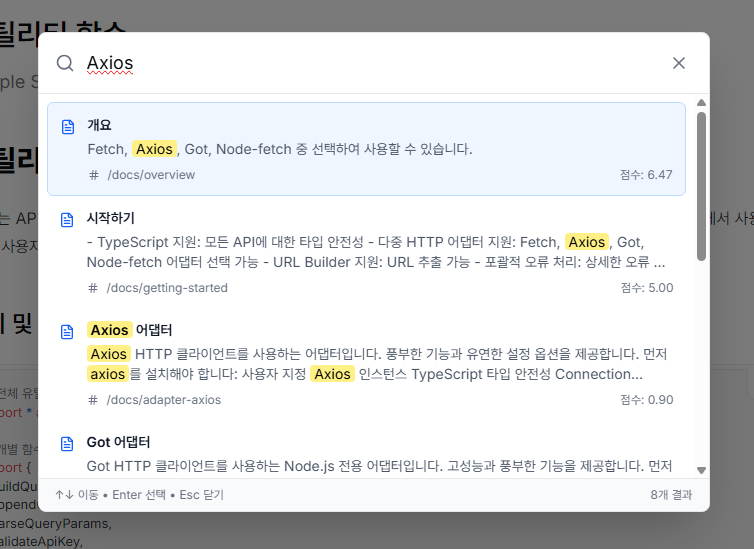
지원하는 검색 패턴
| 검색 방식 | 입력 예시 | 결과 예시 | 설명 |
|---|---|---|---|
| 초성 검색 | ㄷㅈ | 던전앤파이터 | 한국인이 가장 많이 사용하는 패턴 |
| 부분 검색 | 던전 | 던전앤파이터 API | 단어 일부만 입력해도 검색 |
| 함수명 검색 | getCharacter | getCharacter() 설명 | 개발자 친화적 |
사용자 경험
- 빠른 응답: 클라이언트 사이드 검색으로 즉시 결과 표시
- 정확한 위치 이동: 검색 결과 클릭 시 해당 함수/섹션으로 바로 이동
- 키보드 친화적:
Ctrl+K열기, 화살표 키 네비게이션,Enter선택 - 반응형: 모바일에서도 완벽 동작
- 접근성: 스크린 리더 지원, 키보드 네비게이션
성능 지표
| 메트릭 | 값 | 설명 |
|---|---|---|
| 번들 크기 | ~30KB | 3개 라이브러리 합계 |
| 검색 속도 | <10ms | 374개 문서 기준 |
| 메모리 사용량 | ~2MB | 검색 인덱스 포함 |
| 초기 로딩 | ~100ms | JSON 파일 로드 |
결론
“불가능해 보이는 문제도 다른 관점의 접근으로 해결할 수 있다”
직접구현해보자는 마음에 어찌저찌 구현은 했지만, 스스로도 만족스럽지 못한 부분이 많네요. 점점 개선해볼 생각입니다.
추후엔 Orama에서 공식 지원하면 좋겠네요.
그리고 제가 사용한 오픈소스들 모두 훌륭한 라이브러리들이네요. 저도 언젠가 저런걸 만들수 있는 레벨이 되면 좋겠네요.
참고 자료
이 글이 도움되셨나요?
공유해주시면 더 많은 사람들이 볼 수 있어요!